Nous fournissons :
i.un fichier XML pour le format BASIC "Factur-x_BASIC.xml".
ii.un fichier XML pour le format EN 16931 "Factur-x_EN16931.xml".
iii.un PROGRESS include "Factur-X.i" pour faciliter la création du fichier factur-x.xml avec vos données.
iv.une interface graphique puissante pour déboguer les fichiers XML avec l'option CHECK tag
Factur-x_BASIC.xml / Factur-x_EN16931.xml
Nous fournissons ces modèles (templates) xml pour générer facilement le fichier factur-x.xml qui sera joint au PDF Factur-X.
On y trouve des sections et des lignes.
•Les lignes commençant par <!-- à la colonne 1 débutent une nouvelle section.
Dans ces fichiers, 3 sections sont définies : header, detail et footer. Vous pouvez les renommer et/ou définir vos propres sections.
•Dans les lignes standard, des mots-clés peuvent être insérés, ils sont délimités par des %:
%mot-clé [=valeur_par_défaut] %
•Les lignes de sections peuvent être soumises à condition avec $IFDEF..$ELSE...$END. Ces balises à niveaux multiples doivent être les premières balises d'une ligne.
Exemple :
$IFDEF BuyerTaxRegistration
<ram:SpecifiedTaxRegistration>
<ram:ID schemeID="VA">%BuyerTaxRegistration%</ram:ID>
</ram:SpecifiedTaxRegistration>
$ELSE
....
$ENDIF
Format :
<!--header-->
<?xml version='1.0' encoding='UTF-8'?>
<rsm:CrossIndustryInvoice xmlns:qdt="urn:un:unece:uncefact:data:standard:QualifiedDataType:100" xmlns:ram="urn:un:unece:uncefact:data:standard:ReusableAggregateBusinessInformationEntity :100" xmlns:rsm="urn:un:unece:uncefact:data:standard:CrossIndustryInvoice:100" xmlns:udt="urn:un:unece:uncefact:data:standard:UnqualifiedDataType:100" xmlns:xsi="http://www.w3.org/2001/XMLSchema-instance">
<rsm:ExchangedDocumentContext>
<ram:GuidelineSpecifiedDocumentContextParameter>
<ram:ID>urn:cen.eu:en16931:2017#compliant#urn:factur-x.eu:1p0:basic</ram:ID>
</ram:GuidelineSpecifiedDocumentContextParameter>
</rsm:ExchangedDocumentContext>
<rsm:ExchangedDocument>
<ram:ID>%ExchangedDocument%</ram:ID>
<ram:TypeCode>%DocumentTypecode=380%</ram:TypeCode>
<ram:IssueDateTime>
<udt:DateTimeString format="102">%IssueDateTime%</udt:DateTimeString>
</ram:IssueDateTime>
<ram:IncludedNote>
<ram:Content>%IncludedNote%</ram:Content>
</ram:IncludedNote>
</rsm:ExchangedDocument>
<rsm:SupplyChainTradeTransaction>
<!--detail-->
<ram:IncludedSupplyChainTradeLineItem>
<ram:AssociatedDocumentLineDocument> <ram:LineID>%LineDocument> <ram:LineID>%LineDocument
<ram:LineID>%LineID%</ram:LineID>
</ram:AssociatedDocumentLineDocument>
<ram:SpecifiedTradeProduct>
<ram:GlobalID schemeID="0160">%LineProductID%</ram:GlobalID>
<ram:Name>%LineProductName%</ram:Name>
</ram:SpecifiedTradeProduct>
<ram:SpecifiedLineTradeAgreement>
<ram:NetPriceProductTradePrice>
<ram:ChargeAmount>%LineChargeAmount%</ram:ChargeAmount>
</ram:NetPriceProductTradePrice>
.... ....
<!--footer-->
<ram:ApplicableHeaderTradeAgreement>
<ram:SellerTradeParty>
<ram:Name>%SellerName%</ram:Name>
<ram:SpecifiedLegalOrganization>
<ram:ID schemeID="0002">%SellerLegalOrganization%</ram:ID> <!-- SIRET -->
</ram:SpecifiedLegalOrganization>
<ram:PostalTradeAddress>
<ram:PostcodeCode>%SellerPostalCode%</ram:PostcodeCode>
<ram:LineOne>%SellerLineOne%</ram:LineOne>
<ram:LineTwo>%SellerLineTwo%</ram:LineTwo>
<ram:CityName>%SellerCityName%</ram:CityName>
<ram:CountryID>%SellerCountryID=FR%</ram:CountryID> <!-- def country FR -->
</ram:PostalTradeAddress>
...
Liste des variables du fichier Factur-x_BASIC.xml basique
HEADER |
ExchangedDocument DocumentTypecode=380 IssueDateTime IncludedNote |
|
DETAIL |
LineID LineProductID LineProductName LineChargeAmount LineUnitCode=C62 LineQuantity=1 LineTaxTypeCode=VAT LineTaxCategoryCode=S LineTaxPercent=0.00 LineTotalAmount |
|
FOOTER |
SellerName SellerLegalOrganization SellerPostalCode SellerLineOne SellerLineTwo SellerCityName SellerCountryID=FR SellerSpecifiedTaxRegistration |
|
BuyerName BuyerLegalOrganization BuyerPostalCode BuyerLineOne BuyerLineTwo BuyerCityName BuyerCountryID BuyerTaxRegistration BuyerReference BuyerOrderReference BuyerIssuerID |
||
ActualDeliveryDate
PaymentReference InvoiceCurrency=EUR SellerIbanID
CalculatedAmount ExemptionReason BasisAmount CategoryCode=S RatePercent
DueDateTime
TaxBasisTotalAmount currencyID=EUR TaxTotalAmount GrandTotalAmount TotalPrepaidAmount=0.00 DuePayableAmount |
Fichier d'inclusion Factur-x.i
Ce fichier d'inclusion 4GL Progress permet de gérer facilement les données et les fichiers de modèles XML.
Quatre fonctions publiques :
•logique fxOpen( xml_template_File )
•logique fxLoadSection( nom_de_la_section )
•chaîne fxProcess( keyword_values ) où keyword_values est une chaîne délimitée par des tabulations comme "SellerName=4GL" + "~t" + "SellerCityName=Lyon".....
•logique fxClose()
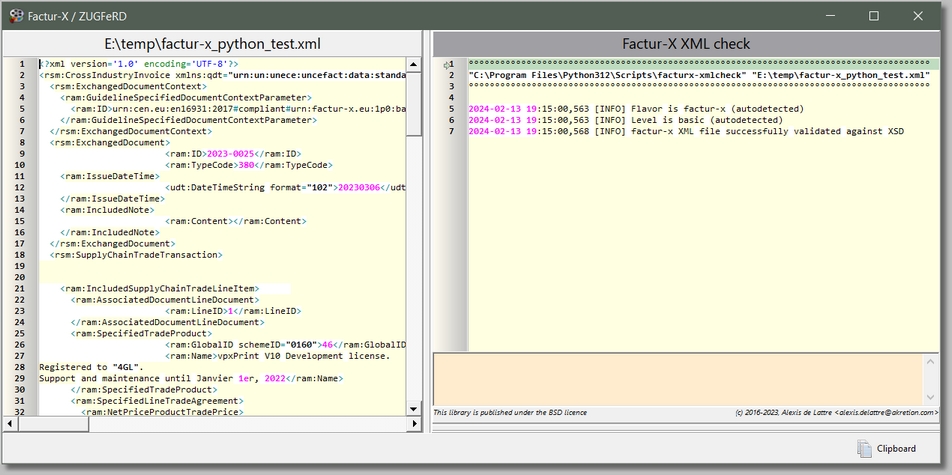
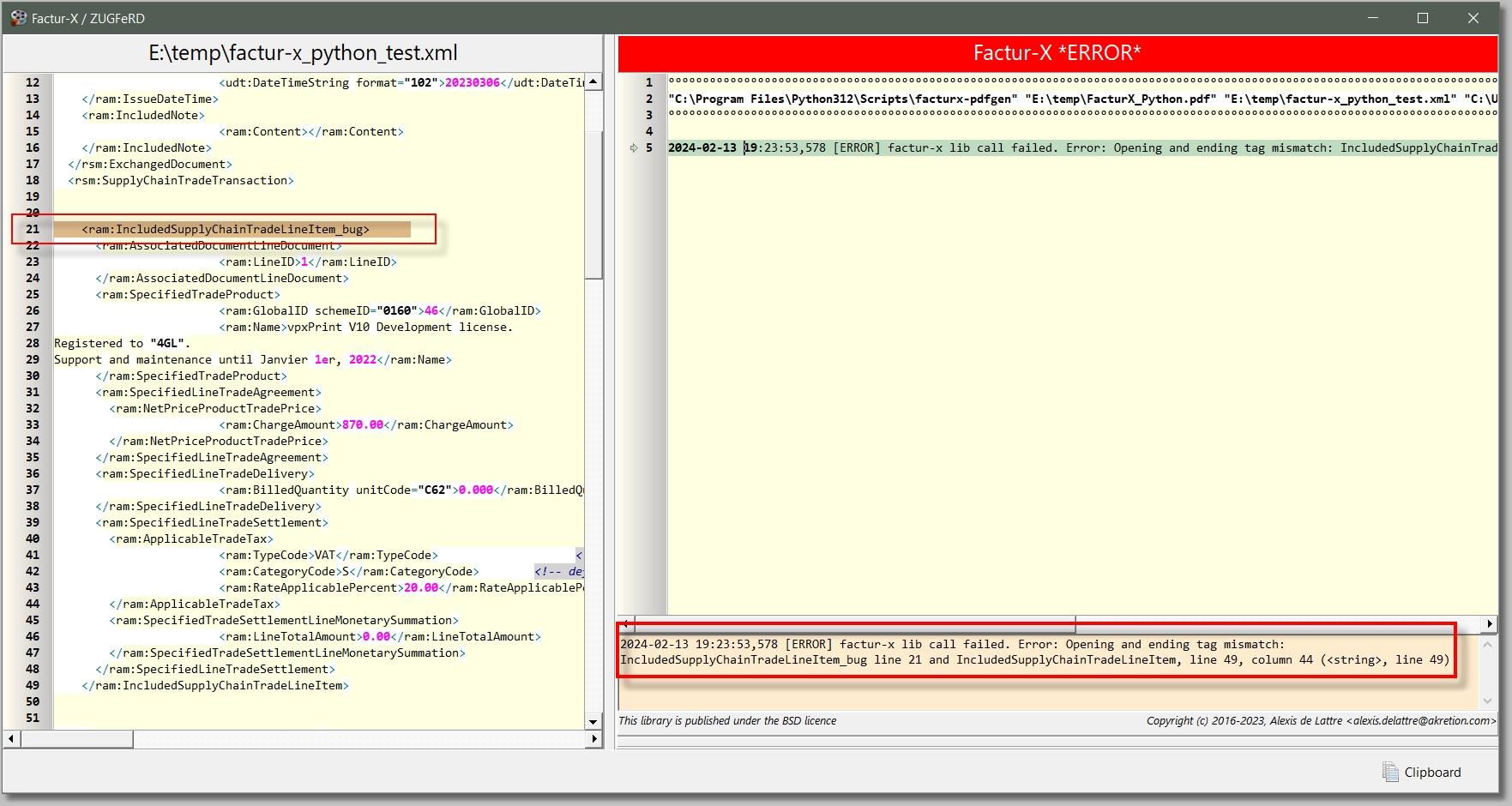
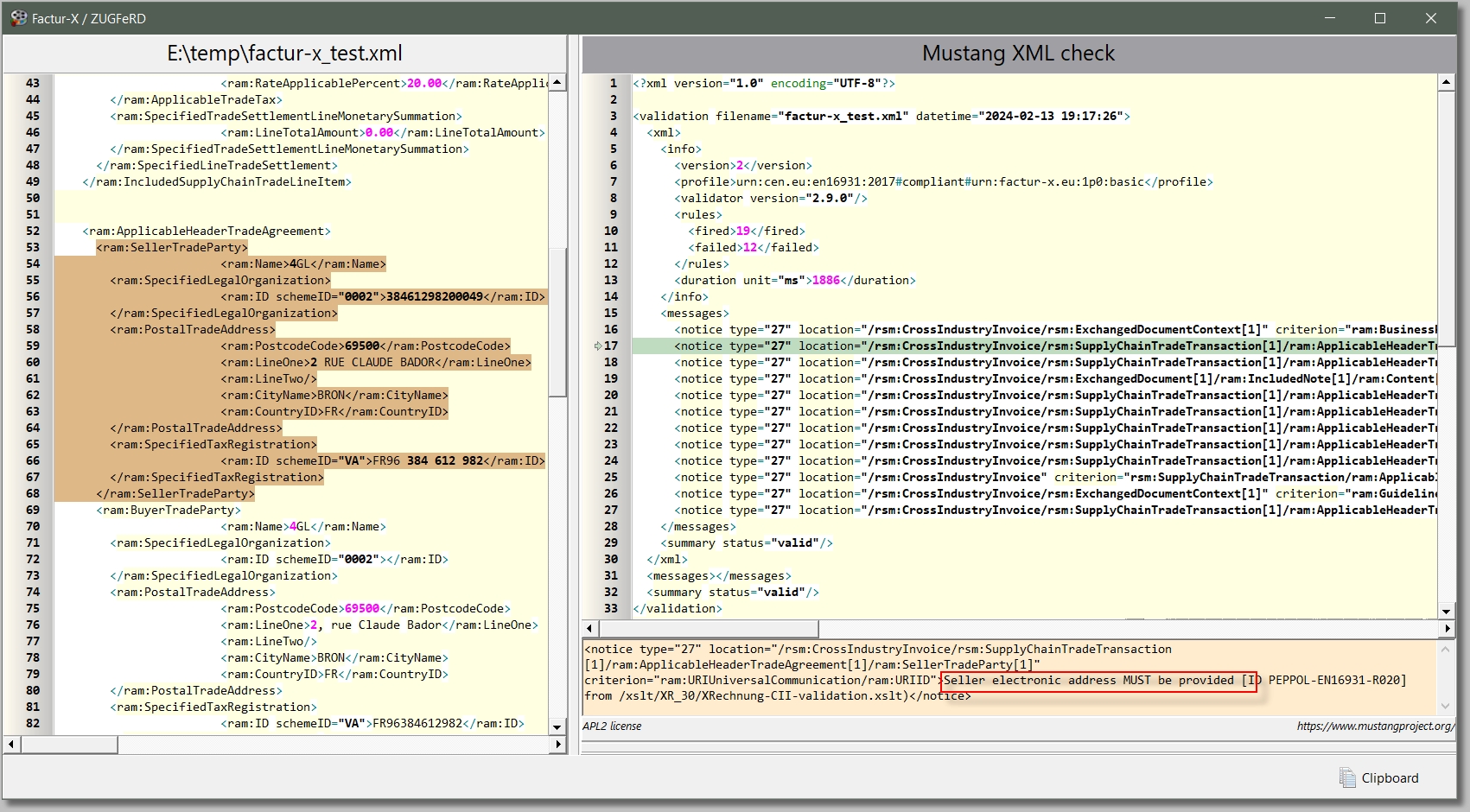
Vérification intégrée du fichier XML
Activé lorsqu'une erreur survient lors de la création du fichier Factur-X/ZUGFeRD ou de l' optionCHECK:
Vérification Python standard
(le plugin Python doit être installé depuis le setup) |
|
Erreur avec le plugin par défaut ou avec le plugin Python
(le plugin Python doit être installé depuis le setup) |
|
Vérification Mustang XML
(Le plugin Java Mustang doit être installé depuis le setup) |
|
 Une simple balise <FACTUR-X,FILE=...,CHECK> peut être utilisée pour vérifier la conformité d'un fichier XML Factur-X dans un mode graphique...