Permet de gérer les paragraphes, l'insertion de puces ou la numérotation des paragraphes à l'intérieur d'une .
Syntaxe :
<INDENT[Cxx
-ou-
nnn]>
Définit un nouveau niveau d'indentation ou ajuste l'indentation à la valeur du niveau précédent pour commencer un nouveau paragraphe.
<INDENT=C5> définit un point d'indentation à la colonne 5 de la frame
<INDENT=12> """" à 12 millimètres ou pouces selon <UNITS>
</INDENT> arrête l'indentation.
Remarque :
Exemple :
<#1><R+30><C+40><FRAME#1><USE#1> définit une nouvelle frame
<JUSTIFY> définit le mode de justification
<U>First paragraph:</U> [CR]
<INDENT=C10>This is the content of the first paragraph. bla bla bla........... définit l'indentation à la colonne 10 de la frame
and bla bla bla</INDENT> [CR][CR]
<U>Second paragraph:</U> [CR]
<INDENT>This is the content of the second paragraph. bla bla bla ........... [CR] se place sur C10
and bla bla bla</INDENT> [CR]
</USE>
Résultat :

Numérotation des paragraphes :
<#1><R+30><C+40><FRAME#1><USE#1> définit un nouveau cadre
<JUSTIFY> définit le mode de justification
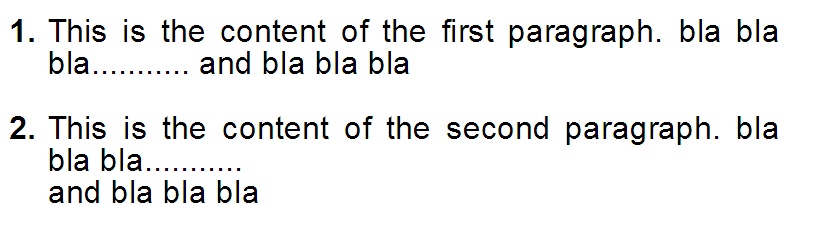
<B>1.</B><INDENT=C3>This is the content of the first paragraph. bla bla bla........... définit l'indentation à la colonne 10 du cadre
and bla bla bla</INDENT> [CR][CR]
<B>2.</B><INDENT>This is the content of the second paragraph. bla bla bla........... [CR] se place sur C10
and bla bla bla</INDENT> [CR]
</USE>
Résultat :